Showing posts with label Windows. Show all posts

Wednesday, 8 October 2014

Increase IDM Speed BY IDM Optimizer

Internet Download Manager as we said is the best download manager right now available as compared to any other download manager like DAP, Microsoft Lightweight Download Manager, Orbit and many others. Its used to download files much faster hence accelerating downloads with this tool is quiet easy and automated. We even posted a nice tutorial on how you can download torrent files using IDM (Internet Download Manager) and even we hosted a nice IDM License Keys Giveaway that went pretty well, it will be refreshed again soon.
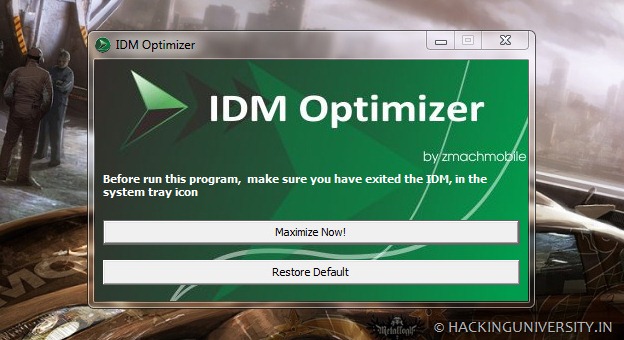
Accelerate IDM Downloads using IDM Optimizer


 Well now we just got our hands on IDM Optimizer, it’s a small utility which boosts your IDM speed by modifying some registry entries like it will change Connection Speed, Connection type, Max Connection Numbers and some other few entries. So this is what above kind of Window you will see when you will fire up the IDM Optimizer software. So it has a simple Maximize Now button which when clicked will popup a note to restart IDM so that it can take effect. Well you can see it also has a Restore Default button which will restore all the settings which IDM came with you can use that if you think that you are not getting good speeds.

Increase IDM Download Speed using IDM Optimizer


  • Download IDM Optimizer Tool


  • Now make sure IDM is installed on your PC, as this tool will only optimize IDM if its physically present on your system.


  • Now just fire up your IDM Optimizer and than you will see window like above just click on Maximize Now and you will get a note asking you to restart your IDM do that and once restart your PC.


  • That’s it now your IDM is boosted with speed, try to download any file and check out if speeds are good or not.


  • If you want to restore your default settings than you can click on Restore Default.

That’s it guys now you have boosted your IDM with Speed, optimized it for faster downloads have fun, well all these settings could be tweaked manually but this one is the fastest and easiest way to bypass all that manual working, so hopefully this will work for you and will provide you some boosted speeds.


Sunday, 5 October 2014

1 MB PDF Raeder For Windows


Whether you're a consumer, business, government agency, or educational organization, you need to read, create, sign, and annotate (comment on) PDF documents and fill out PDF forms. 

Foxit Reader is a small, lightning fast, and feature rich PDF viewer which allows you to create (free PDF creation), open, view, sign, and print any PDF file. 

Foxit Reader is built upon the industry’s fastest and most accurate (high fidelity) PDF rendering engine, providing users with the best PDF viewing and printing experience.

 Available in English, Dutch, French, German, Italian, Portuguese, Russian, and Spanish.

PDF Viewer - Lighting fast PDF view and print of PDF files and portfolios quickly without exhausting system resources.

Easily View Multiple PDF Files - Multi-tab style document display allows users to go back and forth between different PDF documents quickly and easily.

Configurable PDF Viewer - Configure document views with read mode, reverse view, and text viewer options.

 Configure page display with full screen, single page, continuous scrolling, split, two page facing, continuous facing, separate cover page, auto-scroll, and page transition options.

Bookmark Support - Easily add, edit, and modify bookmarks in a PDF document.

Multiple Views - Rotate pages between landscape and portrait. Configure zooming or adjust magnification using the marquee, loupe, and magnifier tools.

 Download
PASSWORD: goldenrare

KGB Archiver For Windows 8 and 8.1


KGB Archiver is not your regular file compressor. It makes all the difference in the world, size-wise, because it can create the tinniest archives. This is due to the fact that its compression rate is amazing, almost unique in its software category.
Various compression options

This small and seemingly plain software is extremely powerful, and it could easily surpass other products of its kind (when it comes to compression size, not speed).

Archives can be made in either KGB or ZIP format, and compression level can be set from minimal to maximum (with a lot of options in between). Plus, you can secure them by assigning a password, no matter which compression level you choose.
Powerful result at the cost of time

For example, we compressed a file of 1.2MB at maximum level. The process took 30 seconds, and the result weighed 366,5KB. Large file take a lot more than that, obviously. So, yes, KBG Archiver is powerful, but it also takes long time for maximum compression level.
Displays helpful info

During compression, KGB Archiver displays the progress, together with the current size versus the projected size and the remaining time. This information is also available in a little window that pops up if you move the mouse over the application icon in the system tray.

KGB Archiver also places shortcuts in the Explorer context menu, but you can make that disappear from the Options window of the application.

To end with


In conclusion, KGB Archiver is willing to cut down your archives in size, but at the price of a long waiting time for very large files. Considering that it can drastically make a difference, the costs are not that high.


 Download

PASSWORD: goldenrare